

L'ufficio VR
Tre monitor ovunque ti sieda. Microsoft Mesh, Desktop Virtuale, riunioni con una stanza integrata.
Cosa significa
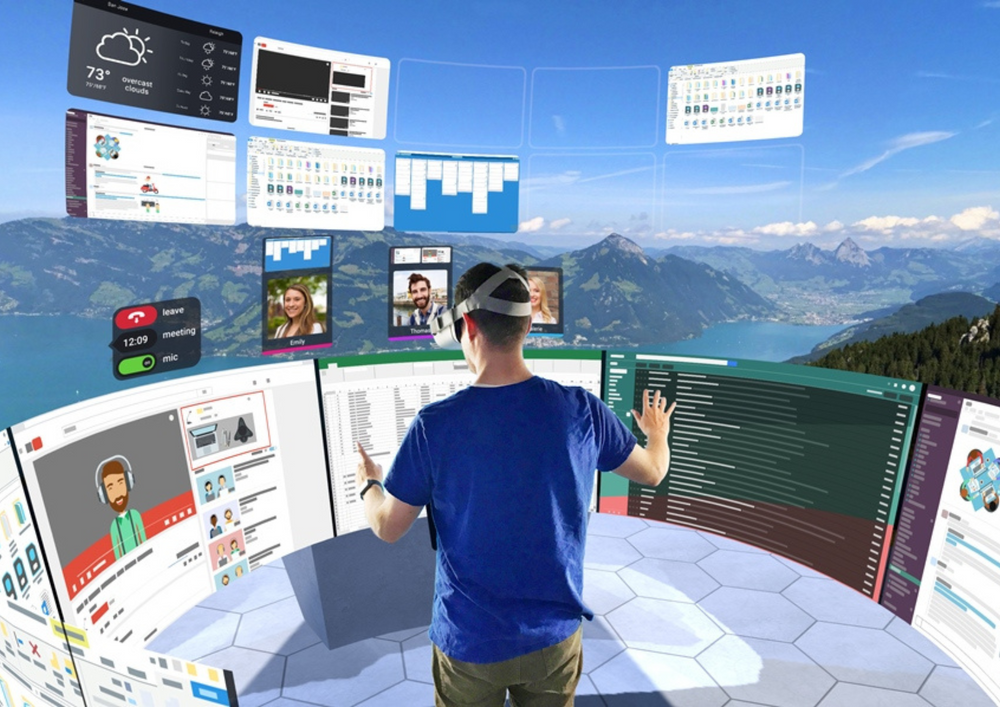
Un visore ti offre quante schermate virtuali vuoi, ovunque: su un treno, in un hotel, in un piccolo appartamento. E le riunioni acquisiscono uno spazio condiviso invece di una griglia di volti.
Il concetto è semplice: i tuoi monitor ora vivono nella tua borsa. Su un treno apri tre grandi schermi; in un appartamento condiviso lavori su un display grande come una parete che nessun altro può vedere. Anche le riunioni cambiano: una lavagna su cui tutti si radunano è meglio di una griglia di webcam per una vera collaborazione.
Dove viene utilizzato
Monitor virtuali
Più schermi grandi ovunque tu sia, su un dispositivo che entra in una borsa.
Riunioni immersive
Microsoft Mesh e Horizon Workrooms mettono il tuo team nella stessa stanza.
Messa a fuoco profonda
Un ambiente senza distrazioni creato per la concentrazione.
Perché la realtà virtuale funziona qui
- Quanti schermi grandi vuoi, ovunque tu voglia
- Privacy: nessuno vede i tuoi schermi tranne te
- Riunioni con presenza reale, non griglie di webcam
- Un progetto pilota di una settimana risponde a "è adatto a me?"
Come va nella pratica
Noleggia un Quest 3
L'opzione comoda per il testo e le sessioni lunghe.
Collega il tuo computer
Virtual Desktop o Immersed rispecchiano il tuo Mac o PC in modalità wireless.
Lavora una vera settimana
Pendolare, caffè, ufficio a casa. Poi decidi con prove.
Lavoratori da remoto · consulenti · sviluppatori · piccoli team · viaggiatori frequenti
App e strumenti che useresti
Desktop Virtuale · Immersed · Microsoft Mesh · Horizon Workrooms
Tutto installato prima della spedizione del tuo headset, e possiamo aggiungere i tuoi su richiesta.
Cuffie per questo
Preinstallato, caricato e consegnato. Reso gratuito in tutta la Svizzera.
Meta Quest 3
I migliori effetti visivi e realtà mista a colori completi: il modello di punta.
Noleggio da 96 CHF al giorno
Visualizza cuffieMeta Quest 3S
Stesso chip e giochi, prezzo più basso: il primo visore facile.
Noleggio da 96 CHF al giorno
Visualizza cuffieMeta Quest 2
Il tuttofare collaudato: perfetto per eventi e grandi gruppi.
Noleggio da 96 CHF al giorno
Visualizza cuffieCome VRENT aiuta
Noleggiamo tutti i visori necessari (Meta Quest 3, Quest 3S e Quest 2), con le app giuste già installate, consegnati e configurati ovunque in Svizzera. La maggior parte delle persone inizia con un pilot di una settimana prima di impegnarsi.
Tre modi per iniziare
Qualunque sia la frequenza con cui ne hai bisogno, c'è un modo che fa per te.
Noleggia un auricolare
Uno o più, da CHF 96/giorno. Preinstallati, consegnati e ritirati in tutta la Svizzera.
Sfoglia cuffie →Crea un pacchetto
Per eventi e gruppi: da 4 a 50 cuffie con personale e allestimento. Configuralo e visualizza il prezzo in un minuto.
Angolo VR Aperto →Unisciti al Club VRENT
Affitti regolari? I membri risparmiano fino al 30%, evitano i depositi e ricevono la consegna prioritaria. A partire da 59 CHF al mese.
Vedi iscrizione →Domande
Può sostituire i miei monitor?
Per il lavoro concentrato e i viaggi, molte persone trovano che sia utile: si ottengono diversi grandi schermi virtuali su un dispositivo che si può mettere in una borsa.
È adatto per le riunioni?
Sì. Microsoft Mesh e Horizon Workrooms mettono un team distribuito in un’unica stanza, non in una griglia di volti.
Esplora di più
Eventi e attivazioni
Da 4 a 50 cuffie, consegnate, installate e con personale.
Servizi per eventiFormazione del team
Incendio, primo soccorso, lavoro in quota su Meta Quest 3.
Vedi formazione →Tour a 360°
Riprendiamo il tuo spazio a 360°, da terra e dall'aria.
Vedi tour →Non sei ancora sicuro?
Ti aiuteremo a capire se la realtà virtuale fa per te.
Consulenza VRPronto a provarlo?
Noleggia un visore con tutto preinstallato, o richiedi un preventivo per un evento completo. Consegna in tutta la Svizzera.