

Das VR-Büro
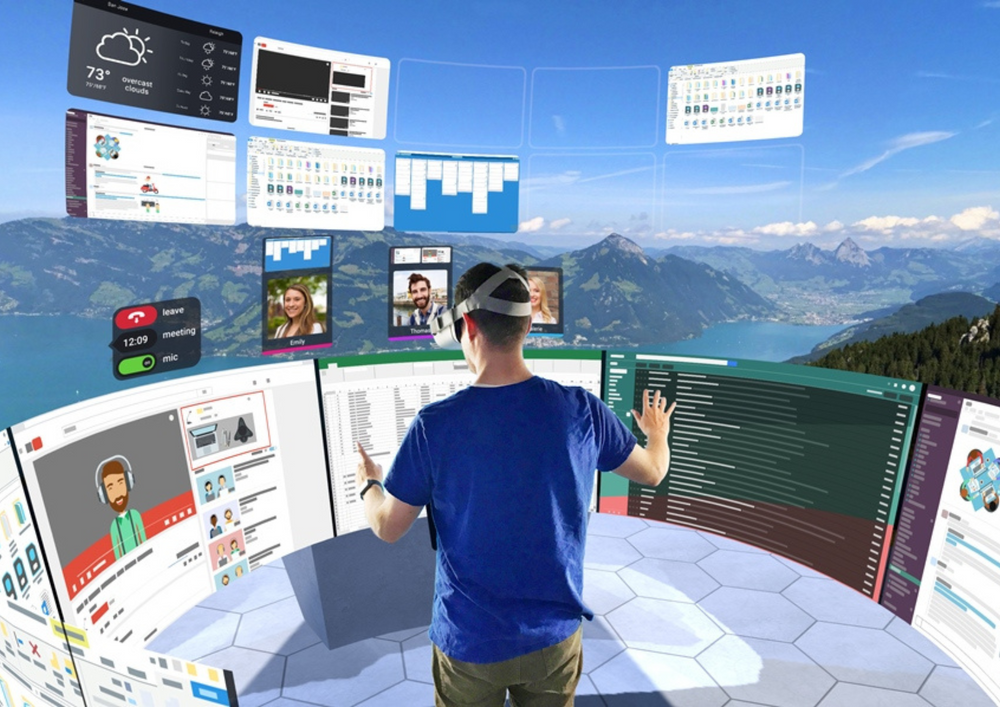
Drei Monitore, egal wo Sie sitzen. Microsoft Mesh, virtueller Desktop, Meetings mit einem Raum darin.
Was es bedeutet
Ein Headset bietet Ihnen so viele virtuelle Bildschirme, wie Sie möchten, überall – im Zug, im Hotel, in einer kleinen Wohnung. Und Meetings erhalten einen gemeinsamen Raum statt eines Rasters von Gesichtern.
Das Konzept ist einfach: Ihre Monitore leben jetzt in Ihrer Tasche. Im Zug öffnen Sie drei große Bildschirme; in einer WG arbeiten Sie an einem wandgroßen Display, das sonst niemand sehen kann. Auch Meetings verändern sich. Ein Whiteboard, an dem alle stehen, ist besser als ein Raster von Webcams für echte Zusammenarbeit.
Wo es verwendet wird
Virtuelle Monitore
Mehrere große Bildschirme, wo immer Sie sind, auf einem Gerät, das in eine Tasche passt.
Immersive Meetings
Microsoft Mesh und Horizon Workrooms bringen Ihr Team in einen Raum.
Tiefenschärfe
Eine ablenkungsfreie Umgebung, die für Konzentration geschaffen wurde.
Warum VR hier funktioniert
- So viele große Bildschirme, wie Sie möchten, überall
- Datenschutz: Niemand sieht deine Bildschirme außer dir.
- Meetings mit Präsenz, nicht nur Webcam-Raster
- Ein einwöchiger Test beantwortet die Frage „Ist das etwas für mich?“
Wie es in der Praxis läuft
Quest 3 mieten
Die bequeme Wahl für Text und lange Sitzungen.
Verbinden Sie Ihren Computer
Virtual Desktop oder Immersed spiegeln Ihren Mac oder PC kabellos.
Arbeite eine richtige Woche
Pendeln, Café, Homeoffice – dann entscheide mit Belegen.
Remote-Mitarbeiter · Berater · Entwickler · kleine Teams · Vielreisende
Apps & Tools, die Sie verwenden würden
Virtueller Desktop · Immersed · Microsoft Mesh · Horizon Workrooms
Alle vorinstalliert, bevor Ihr Headset versendet wird – und auf Wunsch können wir Ihre eigenen hinzufügen.
Headsets dafür
Vorinstalliert, aufgeladen und geliefert. Kostenlose Rückgabe, schweizweit.
Meta Quest 3
Beste Visuals und vollfarbige Mixed Reality – das Flaggschiff.
Mieten ab CHF 96/Tag
Headset ansehen →Meta Quest 3S
Gleicher Chip und Spiele, niedrigerer Preis – das einfache erste Headset.
Mieten ab CHF 96/Tag
Headset ansehen →Meta Quest 2
Der bewährte Alleskönner – ideal für Veranstaltungen und große Gruppen.
Mieten ab CHF 96/Tag
Headset ansehen →Wie VRENT hilft
Wir vermieten jedes Headset, das Sie brauchen (Meta Quest 3, Quest 3S und Quest 2), vorinstalliert mit den passenden Apps, geliefert und eingerichtet überall in der Schweiz. Die meisten beginnen mit einem einwöchigen Testlauf, bevor sie sich festlegen.
Drei Möglichkeiten, um loszulegen
Egal wie oft Sie es brauchen, es gibt eine passende Lösung.
Headset mieten
Einer oder mehrere, ab CHF 96/Tag. Vorgeinstalliert, geliefert und in der ganzen Schweiz abgeholt.
Headsets durchsuchen →Paket erstellen
Für Veranstaltungen und Gruppen: 4–50 Headsets mit Personal und Aufbau. Konfigurieren Sie es und sehen Sie den Preis in einer Minute.
Offene VR-Ecke →Tritt dem VRENT Club bei
Regelmäßig mieten? Mitglieder sparen bis zu 30 %, umgehen Kautionen und erhalten bevorzugte Lieferung – ab CHF 59/Monat.
Mitgliedschaft ansehen →Fragen
Kann es meine Monitore ersetzen?
Für konzentriertes Arbeiten und Reisen finden viele, dass es genau das bietet: mehrere große virtuelle Bildschirme auf einem Gerät, das in eine Tasche passt.
Ist es gut für Meetings geeignet?
Ja. Microsoft Mesh und Horizon Workrooms bringen ein verteiltes Team in einen Raum, nicht in ein Raster von Gesichtern.
Mehr entdecken
Veranstaltungen & Aktionen
4–50 Headsets, geliefert, eingerichtet und besetzt.
VeranstaltungsdienstleistungenTeamtraining
Feuer, Erste Hilfe, Arbeiten in der Höhe auf Meta Quest 3.
Siehe Training →360°-Touren
Wir filmen Ihren Raum in 360°, am Boden und aus der Luft.
Touren ansehen →Noch nicht sicher?
Wir helfen Ihnen dabei herauszufinden, ob VR überhaupt zu Ihnen passt.
VR-BeratungBereit, es auszuprobieren?
Mieten Sie ein Headset mit allem vorinstalliert, oder holen Sie eine Offerte für einen ganzen Anlass. Geliefert in der ganzen Schweiz.